
Crimson Cap Leap Quest
Reviews
Description
Core Objective & Scoring
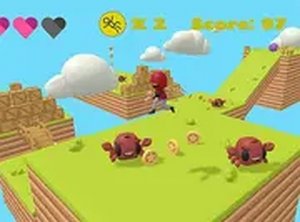
Your main goal is to guide the red-capped character across a series of suspended platforms, collecting as many stars as possible along the way. Each star adds to your score, pushing you closer to the level's target. The game tracks your progress clearly, so you always know how many more stars you need to succeed. Falling off a platform or touching a crab reduces your health, making it harder to continue. The challenge lies in balancing speed with caution to maximize your star count while staying safe.
Platform Navigation & Hazards
The environment is built around moving platforms that shift position over time. You must time your jumps carefully to land safely on each one. Crabs appear on some platforms and will reduce your health if you make contact. The camera control on the right side of the screen lets you look ahead to spot upcoming obstacles and plan your route. This feature is especially useful when platforms are spaced far apart or moving in unexpected patterns.
Timer System & Restart Mechanic
A visible timer counts down from 90 seconds at the start of each attempt. If the timer reaches zero, the level restarts from the beginning, and you lose any progress made during that run. This creates a sense of urgency that encourages efficient movement and quick decision-making. You cannot pause the timer, so every second counts. The restart mechanic adds replay value, as you learn from each attempt and improve your route.
Controls & Accessibility
The game uses simple swipe controls on touchscreens and mouse clicks on desktop. The left side of the screen moves the character left or right, while the right side controls the camera view. This dual-control system works smoothly on both phones and computers without requiring any downloads. Full screen mode is available for a more immersive experience. The bright, colorful art style and straightforward mechanics make the game accessible to players of all ages and skill levels.
Difficulty Progression & Mastery
As you advance, the platforms become more challenging to navigate, with tighter gaps and faster movement. The crab hazards appear more frequently, requiring sharper reflexes. The timer remains constant at 90 seconds, so you must improve your efficiency to succeed. Regular practice helps you develop better timing and spatial awareness. The game rewards patience and careful planning over reckless speed, making each successful run feel earned.







Player Comments
Sign in to comment
You must be logged in before posting a review or rating.
No account? Create one
No comments yet. Be the first to comment!