
Chromatic Tiles Brain Teaser
Reviews
Description
Core Matching Logic
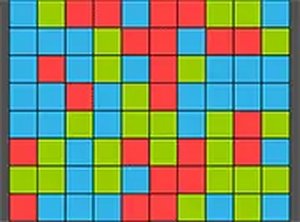
At its heart, Chromatic Tiles Brain Teaser revolves around identifying and selecting adjacent tiles of identical hues. When you click a connected group, those tiles vanish, and the remaining pieces shift to fill the gaps. This simple action creates a satisfying chain reaction that forms the backbone of the entire experience. The game rewards careful observation, as larger clusters yield higher point totals.
Strategic Depth in Simplicity
While the basic move is straightforward, planning ahead becomes essential. After each removal, new tile arrangements appear, and you must consider which groups to clear first. Isolating a single tile can end the round prematurely, so players learn to scan the board for optimal sequences. This layer of foresight transforms each session into a light mental workout.
Visual Presentation and Atmosphere
The game employs bright, WebGL-rendered graphics that make each tile pop against the background. The color palette is carefully chosen to be both vibrant and easy on the eyes, reducing strain during extended play. The clean interface keeps distractions minimal, allowing you to focus entirely on the puzzle at hand. The full-screen mode further enhances this immersive quality.
Accessibility and Session Flow
Chromatic Tiles Brain Teaser is designed for quick, interruption-friendly sessions. There are no timers or penalties for taking your time, so you can pause between moves or step away without consequence. This makes it an ideal companion for short breaks or winding down after a busy day. The controls require only a mouse or keyboard, ensuring broad compatibility across desktop browsers.
Scoring and Replay Motivation
Points accumulate based on the number of tiles cleared in a single action, with larger groups multiplying your score. This system encourages players to seek out bigger clusters rather than making many small moves. The absence of levels or time pressure means you can replay the same board multiple times, experimenting with different clearing orders to improve your final tally. This simple loop provides lasting appeal without demanding a significant time investment.








Player Comments
Sign in to comment
You must be logged in before posting a review or rating.
No account? Create one
No comments yet. Be the first to comment!