

Melody Makers: Toddler Tunes
Reviews
Description
First Notes Made Simple
This online activity is built for the youngest learners. There is no complex setup or reading required. Children simply touch the screen to produce a musical note. Each tap plays the next note in a simple song, so every interaction sounds pleasant. This design removes the frustration of hitting wrong keys and keeps the focus on enjoying the sound.
Three Instruments to Explore
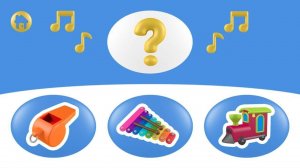
Players can choose between a keyboard, a flute, and a harp. Each instrument produces a distinct tone, allowing children to hear how different materials create different sounds. Switching between them is easy and encourages curiosity about music. The bright, friendly visuals help maintain attention without overwhelming the senses.
Ear Training Through Play
A special mode presents short sequences of notes. The child listens and then taps the correct matching note. This activity builds the ability to recognize pitch differences, a foundational skill for future music lessons. The format feels like a game rather than a test, so children stay engaged while learning.
Safe and Uninterrupted Play
The experience contains no advertisements or external links. Young users can explore freely without encountering inappropriate content or being redirected away from the activity. Parents can feel confident leaving their child to play independently.
Developing Coordination and Creativity
Repeated tapping helps improve hand-eye coordination as children learn to connect what they see with what they hear. The open-ended free-play mode also allows for creative expression, as children can make up their own melodies by tapping in any order. This balance of structure and freedom supports both skill development and imagination.


Player Comments
Sign in to comment
You must be logged in before posting a review or rating.
No account? Create one
No comments yet. Be the first to comment!